Internal Control Assessment List
Overview
The Internal Control Assessment list page displays all approved audit notifications along with their computed assessment scores. Once a notification is approved, it automatically appears here with a Score calculated based on the auditor's questionnaire responses.
Navigate to: Audit > Audit Planning > Internal Control Assessment
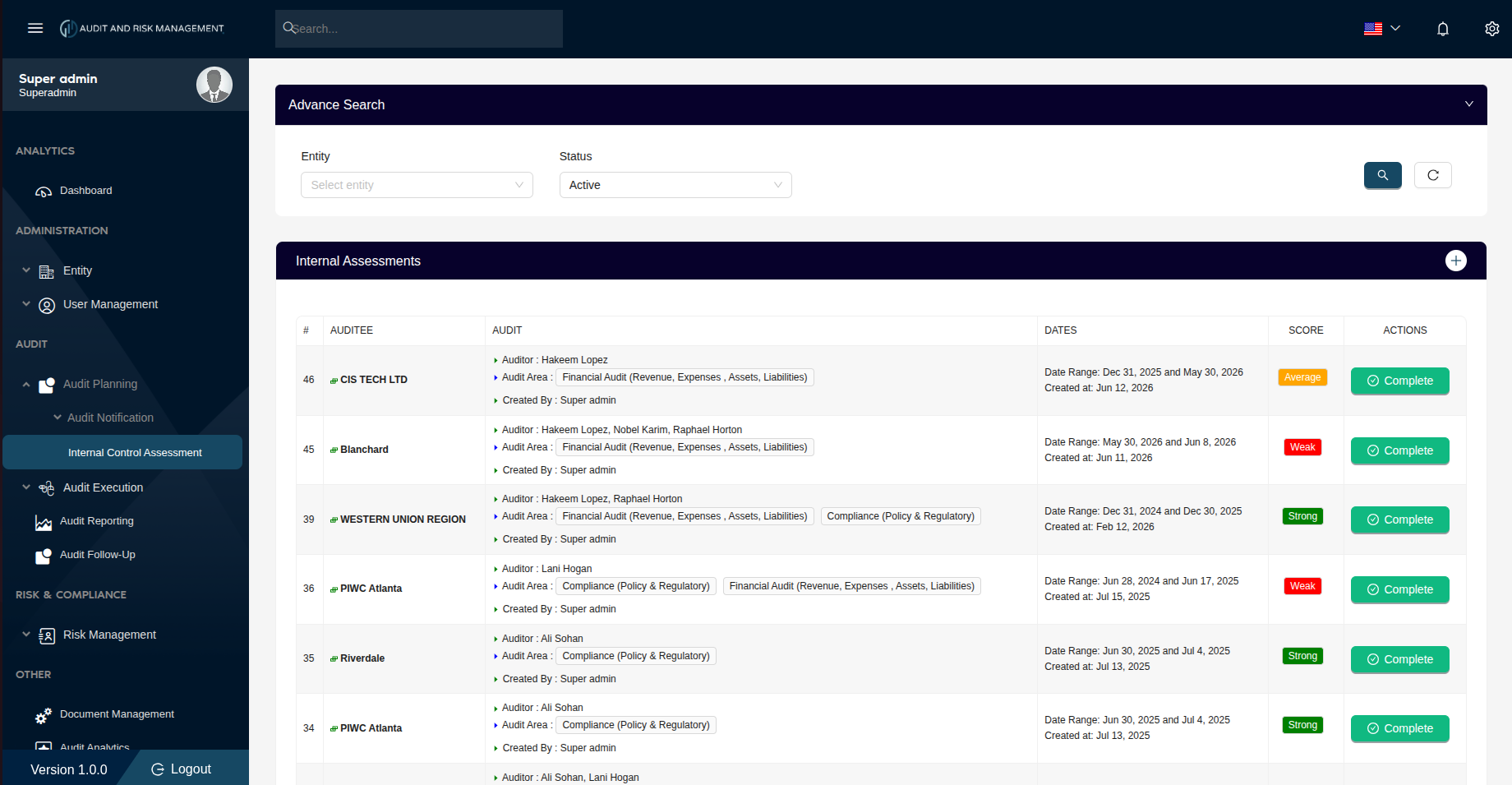
Advanced Search
| Filter Field | Type | Description |
|---|---|---|
| Entity | Dropdown | Filter by the company/entity being audited |
| Status | Dropdown | Filter by status. Default is Active |
!!! tip "Search & Reset" - Click the 🔍 Search button (teal) to apply the filters - Click the ↺ Reset button to clear all filters and reload the full list
Internal Assessments Table
| Column | Description |
|---|---|
| # | Notification ID (sorted in descending order — newest first) |
| Auditee | The company/entity that was audited, with a colored indicator icon |
| Audit | Assigned auditor(s), audit area(s), and the user who created the notification |
| Dates | The audit date range and the date the notification was created |
| Score | Computed score badge based on the ratio of Yes to No answers (see scoring below) |
| Actions | Complete button to mark the audit as fully completed |
Score Calculation
The Score is automatically calculated based on the auditor's responses in the questionnaire. It reflects the ratio of Yes answers to total answered questions (excluding Not applicable).
| Score Range | Badge Label | Badge Color | Meaning |
|---|---|---|---|
| 76–100% | Strong | 🟢 Green | Most internal controls are in place |
| 51–75% | Average | 🟡 Orange | Some controls are in place but improvement is needed |
| 0–50% | Weak | 🔴 Red | Significant internal control gaps identified |
!!! info "Scoring Formula"
Score (%) = (Number of "Yes" answers ÷ Total answered questions) × 100
Questions answered as Not applicable are excluded from the calculation.
**Example:**
- 8 questions answered: 6 × Yes, 1 × No, 1 × Not applicable
- Score = (6 ÷ 7) × 100 = **85.7% → Strong**
!!! warning "Weak Score Action Required" A Weak score (🔴) indicates that the entity has significant internal control deficiencies. Follow-up action or re-audit may be required before completing the assessment.
Audit Column Details
Each row in the Audit column shows:
- Auditor — The assigned auditor(s)
- Audit Area — Scope tags (e.g. Financial Audit, Compliance (Policy & Regulatory))
- Created By — The admin who created the notification
Actions
➕ Add New Assessment
Click the + button on the top-right of the Internal Assessments header bar to navigate to the Send New Notification form.
✅ Complete
Click the Complete button to mark the assessment as fully completed.
!!! info "When to click Complete" Click Complete only after the score has been reviewed and any required follow-up actions have been addressed — especially for Weak scored assessments.
Full Audit Planning Workflow
1. Send New Notification          →  Admin invites a company to audit
              ↓                              (Status: Pending)
2. Notification Detail            →  Auditor fills in Yes / No / Not applicable
              ↓                              (Status: Answered)
3. Internal Control Assessment    →  Reviewer approves the submitted responses
   (Review & Approve page)                   (Status: Approved)
              ↓
4. Internal Control Assessment    →  Score computed and displayed here
   (This list page)                          (Strong / Average / Weak)
              ↓
5. Complete                       →  Audit marked as fully completed
Step-by-Step: How to Complete an Assessment
- Go to Audit → Audit Planning → Audit Notification → Internal Control Assessment
- Review the Score badge for each assessment:
- 🟢 Strong — Controls are in good standing; proceed to complete
- 🟡 Average — Review areas of concern before completing
- 🔴 Weak — Investigate control gaps; consider follow-up before completing
- Click Complete on the assessment to finalize it
!!! success "Expected Result" The assessment is marked as complete and the audit lifecycle for that notification is closed.